
BREAKING: Target Test Prep releases Brand New 2026 On Demand GMAT prep course

Redeem

Target Test Prep · GMAT

Choose how you want to prepare

Learn live with an expert or move at your own pace. Every option includes the complete TTP study system.

★★★★★5.0559 reviews
GMATLiveTeach 7 seats left
Chris Peckover
NEXT LIVE COHORT

Oct 13 to Jan 7, 2027

with Chris Peckover

Schedule
Tue, Thu · 8:00 to 10:00 PM ET
Included
40 live hours + 6 months of GMAT OnDemand
  • Live instruction and real-time questions
  • Class recordings and assigned practice
View class & enroll
Limited cohort · enrollment openTarget Test Prep
EALiveTeach 5 seats left
Logan Thompson
EXECUTIVE ASSESSMENT

Sep 6 to Dec 6, 2026

with Logan Thompson

Schedule
Sun · 9:30 AM to 12:30 PM ET
Included
40 hours of live online classes plus six months of access to the complete TTP EA OnDemand course.
  • 165+ EA Score Guarantee
  • 4,100+ Quant, Verbal, and Integrated Reasoning practice questions
  • 400+ hours of in-depth video lessons
  • 3,000+ step-by-step video solutions
View EA class & enroll
Limited cohort · enrollment openTarget Test Prep
GMATOnDemand Start anytime
SELF-PACED MASTERCLASS

Target Test Prep GMAT OnDemand

Complete access from day one. Study on your schedule.

715+ score guarantee
$0to start then $127/mo
  • Personalized study plan and analytics
  • Thousands of lessons and practice questions

Compare the format, schedule, and included access before enrolling. Prices and seat counts shown reflect the supplied offer details.

Next Button in GMAT Prep Software Test Exam not working!

Post your questions about customer service issues, GMAT exam policies, and GMAT exam structure. Get an official answer from GMAC, the organization behind the GMAT test!
Expert replies
by Maximilian.Gebhardt » Sun Jan 17, 2016 3:13 am
Hello,

I just downloaded the GMAT Prep Software and wanted to take a practice test.
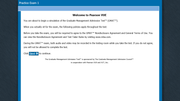
I get the start screen informing about the NDA and with the next button which says there is a next button on the right bottom.
However there is neither a button on the bottom nor does the other button work. So I cannot continue in the exam. (see attached screenshoot)
Could you please help me to resolve this issue?

My laptop runs on Windows 10 and I installed version 2.3.322.

Thanks,
Max
Image
Join the discussion
Source: — Ask the Test Maker |

by [email protected] » Sun Jan 17, 2016 9:52 am
Hi Maximilian.Gebhardt,

It MIGHT be that the software isn't compatible with the version of Windows 10 that you're running, but I'll bet that the website (www.mba.com) will have a FAQ section about this issue and/or a Tech Support contact.

GMAT assassins aren't born, they're made,
Rich
Contact Rich at [email protected]
Image
Join the discussion

Maximilian.Gebhardt wrote:Hello,

I just downloaded the GMAT Prep Software and wanted to take a practice test.
I get the start screen informing about the NDA and with the next button which says there is a next button on the right bottom.
However there is neither a button on the bottom nor does the other button work. So I cannot continue in the exam. (see attached screenshoot)
Could you please help me to resolve this issue?

My laptop runs on Windows 10 and I installed version 2.3.322.

Thanks,
Max
Image
Hi Max,

In order to proceed to the Next button, please follow the instructions below to change the size of the text/font:

Open Screen Resolution by swiping in from the right edge of the screen, tapping Search (or if you're using a mouse, pointing to the upper-right corner of the screen, moving the mouse pointer down, and then clicking Search), entering Display in the search box, tapping or clicking Settings, and then tapping or clicking Display.

Then do the following:
  • - Choose Smaller - 100% (default). This keeps text and other items at normal size.
    - Tap or click Apply.
    - To see the new text size, close all of your apps, and then sign out of Windows. The change will take effect the next time you sign in.
Thanks,
Jeremy
Leah
Official GMAC Representative

Have a question about customer service issues, GMAT exam policies, or GMAT exam structure? Post your question in our Ask the Test Maker forum!
Join the discussion

Ttt

by brijesh5388 » Sat Mar 24, 2018 4:33 am
Thanks
Maximilian.Gebhardt wrote:Hello,

I just downloaded the GMAT Prep Software and wanted to take a practice test.
I get the start screen informing about the NDA and with the next button which says there is a next button on the right bottom.
However there is neither a button on the bottom nor does the other button work. So I cannot continue in the exam. (see attached screenshoot)
Could you please help me to resolve this issue?

My laptop runs on Windows 10 and I installed version 2.3.322.

Thanks,
Max

Image

Hi Max,

In order to proceed to the Next button, please follow the instructions below to change the size of the text/font:

Open Screen Resolution by swiping in from the right edge of the screen, tapping Search (or if you're using a mouse, pointing to the upper-right corner of the screen, moving the mouse pointer down, and then clicking Search), entering Display in the search box, tapping or clicking Settings, and then tapping or clicking Display.

Then do the following:
  • - Choose Smaller - 100% (default). This keeps text and other items at normal size.
    - Tap or click Apply.
    - To see the new text size, close all of your apps, and then sign out of Windows. The change will take effect the next time you sign in.
Thanks,
Jeremy[/quote]
Join the discussion

Hi,
I am using a macbook pro 2017_Sierra version. In my case the exam doesn't end. I chose Verbal-Quant-IR-AWA. After AWA. I pressed the next button then the screen came for reporting not reporting and then I pressed Next to end the exam... It doesn't show anything, except shows " Your Question is being Evaluated" I also checked the pop-up blocker and allowed all content. But still doesn't move beyond this page " Your Question is being Evaluated" . I have a 8o mbps data connectivity so speed is also not an issue.
OfficialGMAT wrote:
Maximilian.Gebhardt wrote:Hello,

I just downloaded the GMAT Prep Software and wanted to take a practice test.
I get the start screen informing about the NDA and with the next button which says there is a next button on the right bottom.
However there is neither a button on the bottom nor does the other button work. So I cannot continue in the exam. (see attached screenshoot)
Could you please help me to resolve this issue?

My laptop runs on Windows 10 and I installed version 2.3.322.

Thanks,
Max
Image
Hi Max,

In order to proceed to the Next button, please follow the instructions below to change the size of the text/font:

Open Screen Resolution by swiping in from the right edge of the screen, tapping Search (or if you're using a mouse, pointing to the upper-right corner of the screen, moving the mouse pointer down, and then clicking Search), entering Display in the search box, tapping or clicking Settings, and then tapping or clicking Display.

Then do the following:
  • - Choose Smaller - 100% (default). This keeps text and other items at normal size.
    - Tap or click Apply.
    - To see the new text size, close all of your apps, and then sign out of Windows. The change will take effect the next time you sign in.
Thanks,
Jeremy
Join the discussion

by OfficialGMAT » Thu May 31, 2018 8:42 am
riteshpatnaik wrote:Hi,
I am using a macbook pro 2017_Sierra version. In my case the exam doesn't end. I chose Verbal-Quant-IR-AWA. After AWA. I pressed the next button then the screen came for reporting not reporting and then I pressed Next to end the exam... It doesn't show anything, except shows " Your Question is being Evaluated" I also checked the pop-up blocker and allowed all content. But still doesn't move beyond this page " Your Question is being Evaluated" . I have a 8o mbps data connectivity so speed is also not an issue.
OfficialGMAT wrote:
Maximilian.Gebhardt wrote:Hello,

I just downloaded the GMAT Prep Software and wanted to take a practice test.
I get the start screen informing about the NDA and with the next button which says there is a next button on the right bottom.
However there is neither a button on the bottom nor does the other button work. So I cannot continue in the exam. (see attached screenshoot)
Could you please help me to resolve this issue?

My laptop runs on Windows 10 and I installed version 2.3.322.

Thanks,
Max

Image
Hi Max,

In order to proceed to the Next button, please follow the instructions below to change the size of the text/font:

Open Screen Resolution by swiping in from the right edge of the screen, tapping Search (or if you're using a mouse, pointing to the upper-right corner of the screen, moving the mouse pointer down, and then clicking Search), entering Display in the search box, tapping or clicking Settings, and then tapping or clicking Display.

Then do the following:
  • - Choose Smaller - 100% (default). This keeps text and other items at normal size.
    - Tap or click Apply.
    - To see the new text size, close all of your apps, and then sign out of Windows. The change will take effect the next time you sign in.
Thanks,
Jeremy
Hello,
I apologize for the delay and frustrations!
If you go back to your practice exam, there should be a Continue option, and it should allow you to click Continue, and click the Next button to the end of your practice exam. If this does not work, please try clearing your cache and cookies, and attempting again in a new browser tab. If this still does not work, please reach out to our Customer Care if you have not done so already, and they can escalate to the development team for assistance.
Thanks!
Leah
Leah
Official GMAC Representative

Have a question about customer service issues, GMAT exam policies, or GMAT exam structure? Post your question in our Ask the Test Maker forum!
Join the discussion
















